Step-by-step guide
GoMining Miner Wars, explained step by step
Miner Wars is GoMining's free game mode: your miners stop collecting BTC every day and compete in clans for real bitcoin blocks. You get paid once a week, on Tuesday. Here is every screen of the app, with numbers.
You don't have to do anything during a round: if you are in a clan, you are playing. Spells are optional and cost GOMINING tokens.
What you need to play
- At least one digital miner.The free Bonus Miner on its own doesn't qualify, and its hashrate doesn't count towards clan requirements.
- A clan.You join an open one with a single tap, or ask to join a moderated one. We show you how further down.
- Nothing else.Joining costs no money. The only thing you pay for is spells, and they are optional.
No miner yet? The GoMining beginner's guide takes you from sign-up to your first miner in four steps.
How a round works
-
One round = one block
It lasts as long as the network takes to find the next bitcoin block: about 10 minutes on average, sometimes seconds, sometimes over an hour. There are around 120-150 a day.
-
You score points
Every second you add
TH × 20 ÷ W/THpoints. 100 TH at 12 W/TH gives 166.7 points per second. The more efficient your miner, the more points per TH. -
The block is drawn
Your chance is your share of all the points in the league. It is a weighted draw: whoever has the most points doesn't always win.
-
The multiplier
Every round gets a random one: x1, x2, x4… up to your league's cap (x32 in Dune, x256 in Odyssey). Winning an x32 counts as 32 blocks.
-
Where the prize comes from
The league's BTC pool is what its players would have mined solo that week. It is split among the clans that win rounds, weighted by multiplier.
-
How the clan splits it
The clan's BTC is divided by each member's TH, not by who won the round. The personal winner also takes a prize in GOMINING.
| League | How many | Max multiplier |
|---|---|---|
| Odyssey | 1, of 30 clans | x256, plus an extra GOMINING pot |
| Eclipse | 3, of 30 clans | x128 |
| Horizon | 9, of 30 clans | x64 |
| Dune | 27 divisions, no clan limit | x32 |
Structure since 6 October 2026. New clans start in Dune; when each week closes, the top 3 of each league go up and the bottom 9 go down (nobody drops out of Dune). More than half of all rounds come out x1. From the official game rules, updated on 3 November 2026.
How many points do you score, and what share of the clan is yours? The Miner Wars calculator works it out from your TH and your W/TH.
A tour of the app, screen by screen
The screenshots come from YouTube videos from February, August and September 2026. Some show the app in Spanish and others in English: we say which on each one. Tap a screenshot to see it full size.
1. Home: where the Miner Wars button is
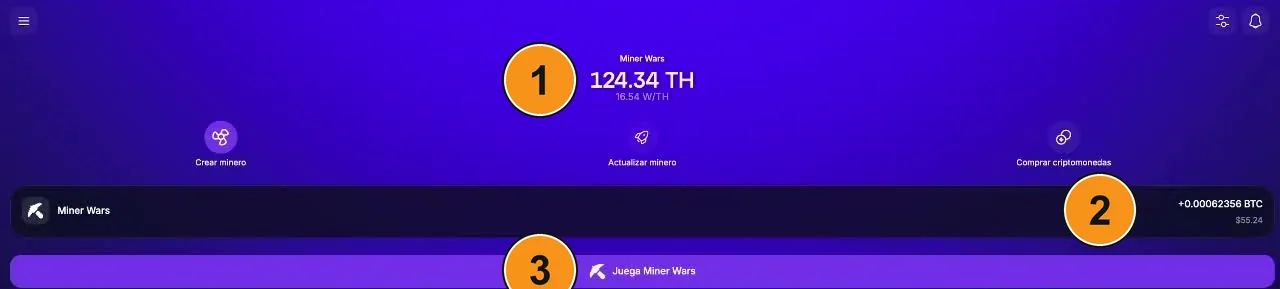
- Your farm: total TH and efficiency (W/TH). Above it you can read "Miner Wars": the mode your farm is in.
- Miner Wars card: what you were paid last week, in BTC and in dollars.
- "Juega Miner Wars" (Play Miner Wars): opens the game. The first time, it asks you to pick a clan.
2. The game screen
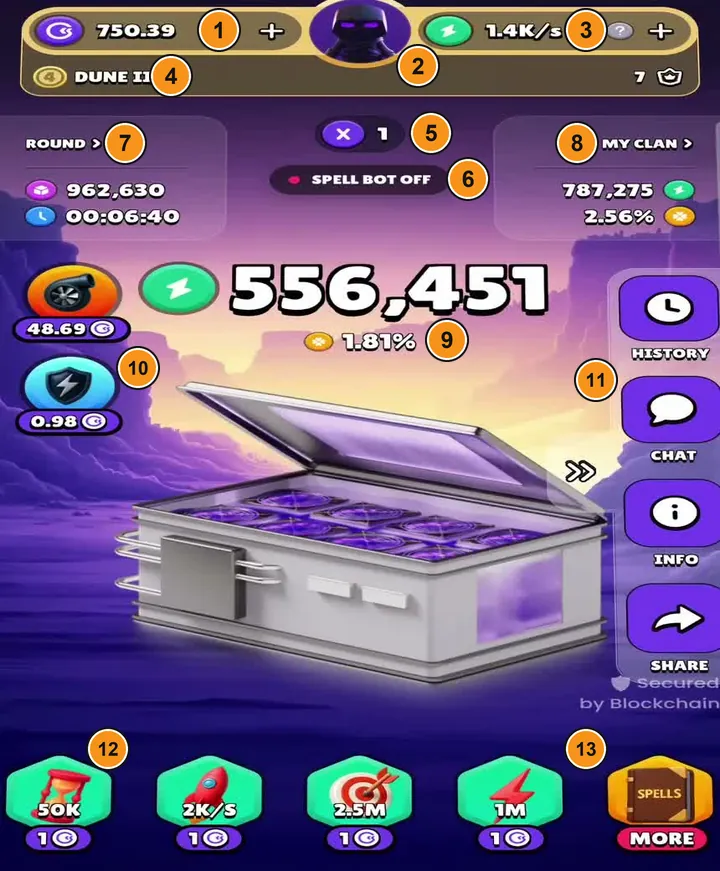
This is where you spend almost all your time. From top to bottom:
- GOMINING balance, with "+" to top up.
- Your avatar: opens your profile (screen 5).
- Your points per second (PPS).
- Your league and its division.
- Multiplier of the current round.
- Spell Bot, on or off.
- Round: the block in play and a timer. Tap it to see the clans in the round.
- My clan: the clan's points and its chance of winning.
- Your points in this round and, below, your chance.
- Power-up and Clan power-up, with their price in GOMINING.
- History, clan chat, info and share.
- Pinned spells, to cast them with one tap.
- Spells · More: the full shop (screen 3).
In other versions, Miner service (a grey broom) appears to the left of the spells: it is free, tap it once a day. Since 3 November 2026 there is also a free Mini boost next to the Power-up, only in the mobile app; it isn't in any screenshot yet.
3. The spell shop
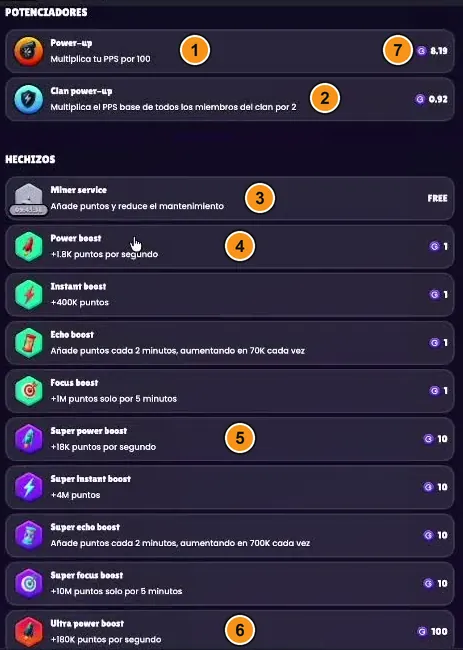
- Power-up: multiplies your PPS by 100 until the end of the round.
- Clan power-up: raises the PPS of the whole clan.
- Miner service: free, once a day.
- Green spells (Power, Instant, Echo, Focus): 1 GOMINING.
- Purple (Super): 10 times the effect, 10 GOMINING.
- Red (Ultra): 100 times the effect, 100 GOMINING.
- Price of each. The two power-ups' price changes with your hashrate.
Tapping a spell casts it and charges you on the spot. The points of each spell change every few weeks: the ones in this screenshot (1.8K/s, 400K…) are from February. Check today's in your app.
4. Spell Bot: spells on autopilot
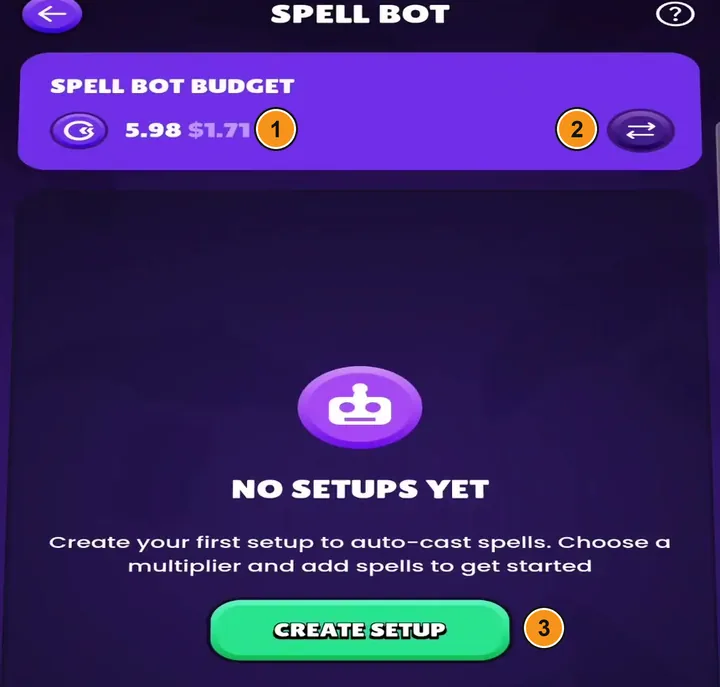
The official bot casts spells for you. You open it from the spells section.
- Bot budget: a balance separate from your wallet.
- Move tokens from your wallet to the bot, and back.
- Create setup: you pick a multiplier and which spells to cast on it, in order.
It is the only bot allowed. Third-party bots are banned.
5. Your profile: switch clan or go back to solo
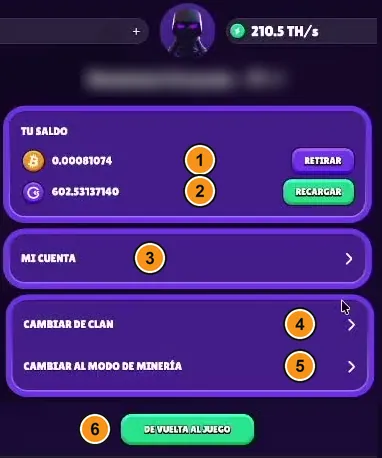
- Your BTC, with the Withdraw button.
- Your GOMINING, with the Top up button.
- My account.
- Change clan: opens the clan list.
- Switch to mining mode: you leave Miner Wars and go back to solo.
- Back to the game.
6. The clan list: join, request or create
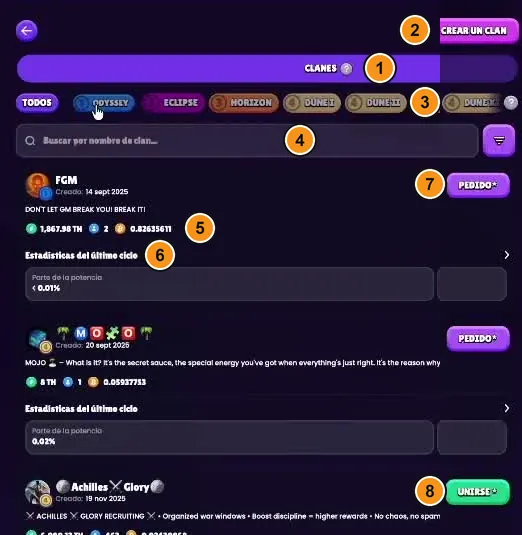
- Clans and, next to it, Requests (the ones you have pending).
- Create a clan: only with VIP Gold I or higher, or with Platinum+.
- League filter.
- Search by name.
- The clan's TH, members and BTC earned. Above, the description with its rules.
- Last-cycle stats: its share of the hashrate, of the points and of the blocks.
- "Pedido" (Request), purple: a moderated clan, the owner has to accept you.
- "Unirse" (Join), green: an open clan, you go straight in.
Read the description before you join: some clans require you to spend on spells and kick out passive players. A clan accepts people while it has fewer than 50 members, and you get 6 clan entries per year.
7. Your clan's page
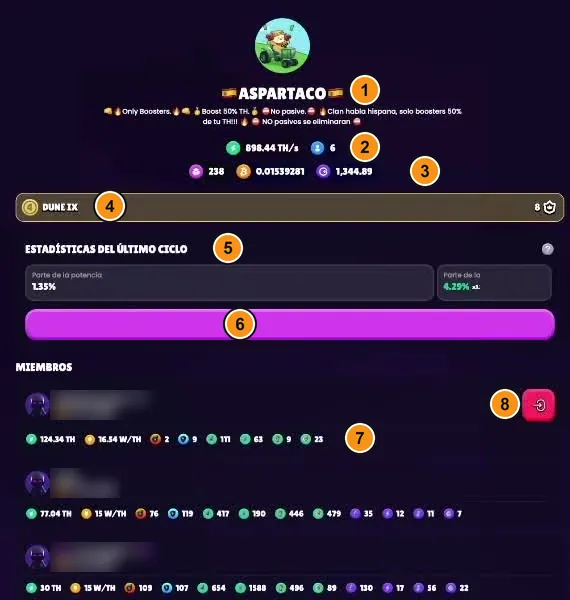
- Name and rules of the clan.
- Total hashrate and number of members.
- Blocks, BTC and GOMINING won.
- League it plays in.
- Last-cycle stats.
- The pink bar is "More stats".
- Each member: TH, W/TH and how many spells of each type they have used.
- Red button on your row: going by the icon, it is the one to leave the clan.
It opens when you tap "My clan" on the game screen.
8. Your rewards
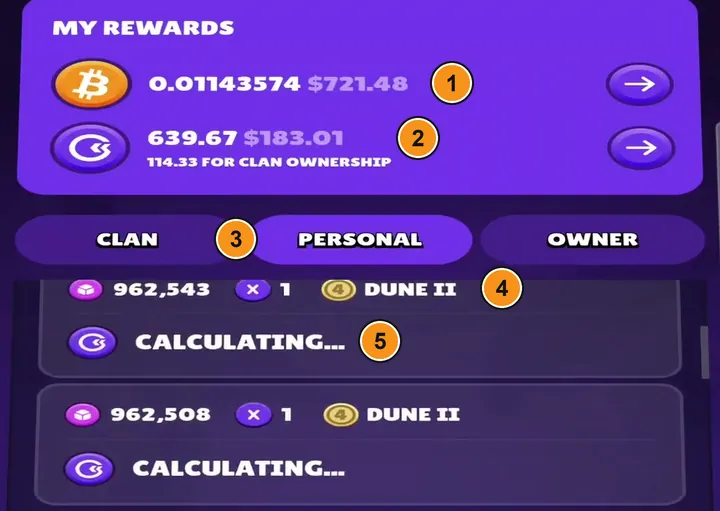
It opens from the coins icon in the bottom menu.
- Total paid in BTC.
- Total in GOMINING and, below, what you got as a clan owner.
- Clan / Personal / Owner: your clan's blocks, the ones you won yourself and your owner commissions.
- Each block won: number, multiplier and league.
- "Calculating…" while the week is still open. When it closes, the amount appears.
9. The weekly leaderboard
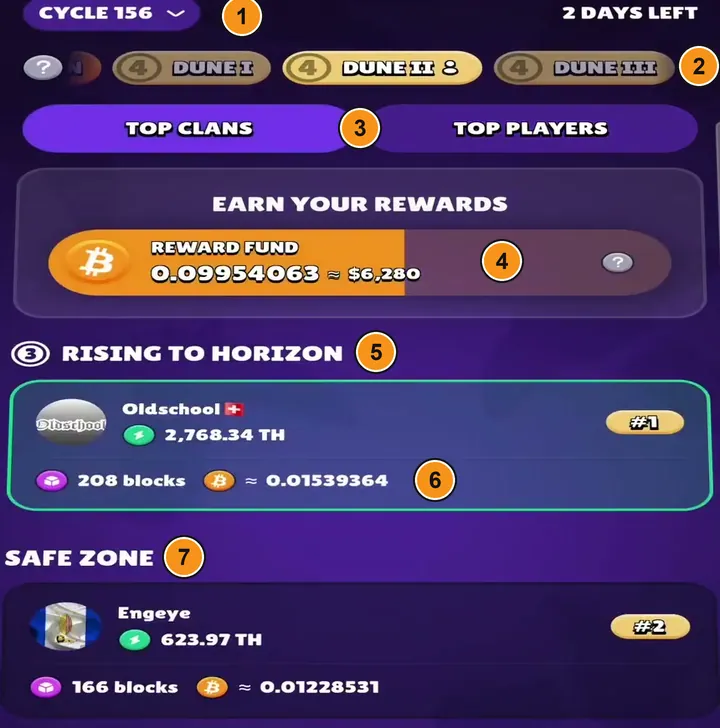
It is the podium icon in the bottom menu.
- Week (cycle) and days left.
- Leagues: swipe to see the others.
- Top clans / Top players.
- League pool in BTC. Tap it to see where it comes from (next screenshot).
- Promotion zone: these clans move up a league.
- Each clan: TH, blocks won and estimated BTC.
- Safe zone: they neither go up nor down. Further down is the relegation zone.
9 b. The BTC pool, from the inside
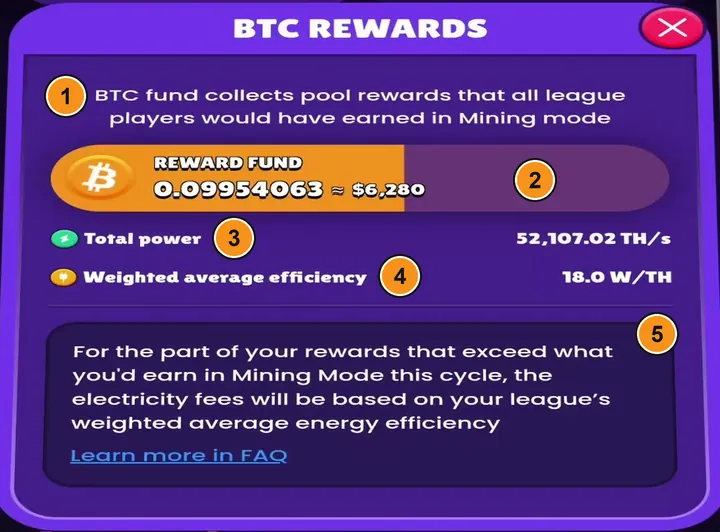
- Where it comes from: what the league's players would have earned mining solo.
- Total pool for the week.
- Total hashrate of the league.
- Average efficiency of the league.
- The small print: whatever you earn above your solo amount pays electricity at that average efficiency, not at yours.
10. Round details
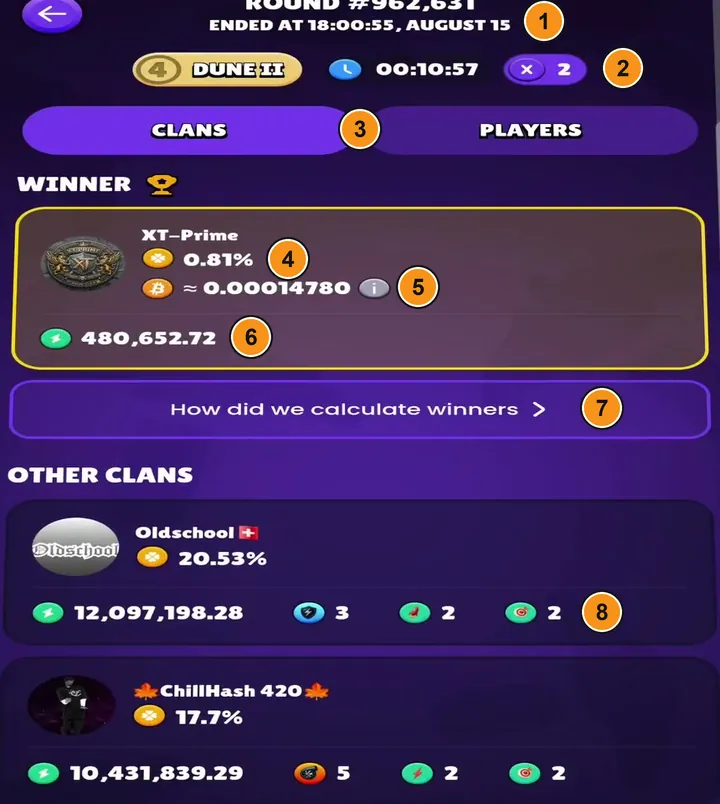
You open it from the "Round" panel or from the history.
- Block and the time it ended.
- League, duration and multiplier.
- Clans / Players: winners by clan or by player.
- Chance the winner had. Here, 0.81%: it won anyway.
- Estimated BTC for that round.
- Points of the winner.
- How the winner was calculated.
- The other clans: chance, points and spells they cast.
Look closely: the clan with a 20.53% chance lost to one with 0.81%. That's how the draw works.
10 b. When a round ends
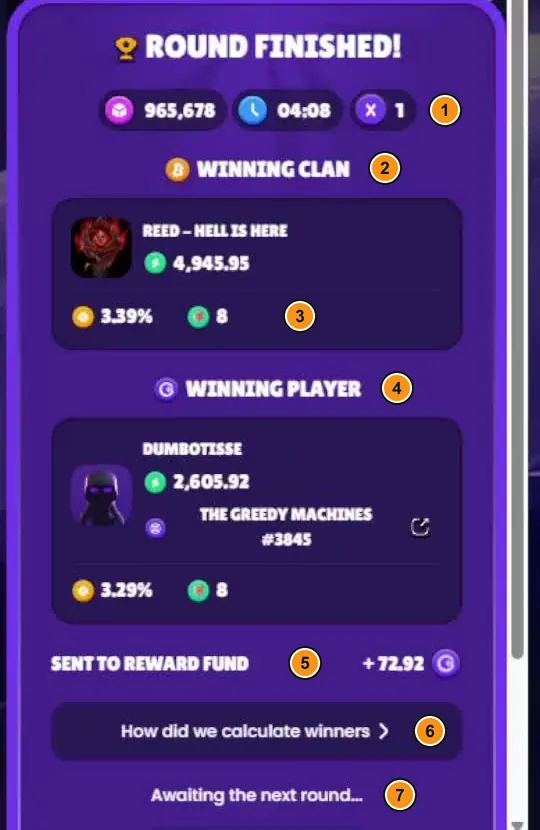
When each round ends, this notice pops up on the game screen.
- Block, duration and multiplier.
- Winning clan: takes the round's BTC.
- Its chance of winning.
- Winning player: takes the GOMINING prize.
- GOMINING that round adds to the prize pool.
- How it was calculated.
- Waiting for the next round.
Spells at a glance
| Spell | What it does | Cost | When |
|---|---|---|---|
| Miner service | Instant points and up to a 3% maintenance discount if you tap it 10 days in a row | Free, 1 a day | Every day |
| Mini boost | +10,000 points for watching a full ad | Free, 1 per round, mobile app only | Whenever you like |
| Power (rocket) | Extra points every second until the end of the round | 1 / 10 / 100 | Early in the round |
| Instant (lightning) | A burst of points after 3 seconds | 1 / 10 / 100 | Short rounds |
| Echo (hourglass) | Points every 2 minutes, more each time | 1 / 10 / 100 | Long rounds |
| Focus (target) | Lots of points, but they only count for 5 minutes | 1 / 10 / 100 | If you bet the round ends soon |
| Power-up (turbine) | Your PPS times 100 until the end of the round | Variable: rises with your hashrate | Early in the round |
| Clan power-up (shield) | Raises the PPS of the whole clan; the more members cast it, the stronger it gets (from x1 to x3.5) | Variable; in the videos, between 0.9 and 1.8 | When your clanmates cast it |
Cost in GOMINING: green / Super / Ultra. With Platinum+ spells cost 15% less. If the round ends before a spell takes effect, it isn't refunded. GoMining adjusts each spell's points every few weeks: current values are in the app.
When they pay off: the rule of thumb
- Free stuff, always.Miner service every day and Mini boost whenever you can. They cost nothing and they add up.
- Set a cap per block.Fernando Mining, who plays in an active clan, uses this rule: never spend more than ¼ of what an x1 block pays in your league, and never more than half.
- Don't get into bidding wars.On low multipliers some clans spend more than the block is worth. One player saw 49 GOMINING spent on an x4 that paid about 27.
- Passive play wins too.Players who publish their numbers agree: most of their blocks were won without casting anything.
What everyone spends on spells comes back almost entirely as prizes: 97.5% goes into the league's GOMINING pot. To see how much weight you carry in your clan before you spend, use the Miner Wars calculator.
Exactly how much to spend, with examples and real players' data: Miner Wars strategy and when spells are worth it.
The Miner Wars week and when it pays out
- While the week runsYour blocks show as "Calculating…". The amount appears once it is final.
- Maintenance is charged in one goWhen the week closes. Keep GOMINING in your wallet that Tuesday if you pay maintenance with it: if there isn't enough, it is charged in BTC without that discount.
- GOMINING prizesAlso land in your wallet on Tuesday, and they pay no maintenance.
Tuesday 18:00 UTC converted to your city, and what to check if it doesn't arrive: when does GoMining pay out.
Miner Wars or solo mining?
Solo (Mining mode)
- You get BTC every day.
- No surprises from one week to the next.
- Nothing to keep an eye on.
- Better if your miners are much more efficient than your league's average.
Miner Wars
- You get paid once a week.
- Some weeks more than solo, others less.
- An extra GOMINING prize if you win rounds.
- Community, chat and clan strategy.
| Player | When | Versus solo |
|---|---|---|
| FreeVale, passive clan | Dec 2025 | ×1.54 over their latest cycles |
| NFT Miner, clan in Odyssey | Mar 2026 | 25-30% more over 7-8 weeks, plus GOMINING on top |
| Fernando Mining, active clan in Dune | Feb 2026 | Similar to solo; some weeks, less |
| Digital Miner Nick | Nov 2026 | 10-15% more, counting the GOMINING |
Figures each player shares on their YouTube channel: they are one person's experience, not an average or a promise. Miner Wars splits what the league mines; it doesn't guarantee any result.
How to go back to solo
- On the game screen, tap your avatar (top, centre).
- Tap the option to switch to mining mode («Cambiar al modo de minería» in the Spanish app).
- Your farm goes back to solo. Daily BTC returns after one full UTC day.
Leaving doesn't use up any of your 6 entries for the year; joining again does. And switching clans often can be treated as clan cycling, which is banned: only do it when it makes sense.
What to check before you switch, how to create your own clan and what happens to that week's winnings if you leave mid-week: Miner Wars clans.
What next?
Frequently asked questions
How do you play GoMining Miner Wars?
Open the app, tap Play Miner Wars and join a clan. From the next round on you are playing: your miners score points on their own. Spells are optional and cost GOMINING; Miner service and Mini boost are free.
What is Miner Wars, explained simply?
A game mode where your farm stops mining solo and competes in clans. Each round is a real bitcoin block and one clan wins it by draw, with better odds the more points it has. The prize comes from what the league would have mined solo.
What rewards does Miner Wars give and when are they paid?
BTC for the rounds your clan wins, split by each member's TH, and GOMINING if you win a personal round. It all arrives on Tuesday, before 18:00 UTC, with nothing to claim.
Is Miner Wars better than solo mining?
It depends on you. Solo pays every day with no surprises. Miner Wars pays once a week, with weeks better and worse than solo, and a possible GOMINING prize. Players who publish their numbers report anything from roughly the same as solo to a little over 50% more, depending on the week and the clan.
How do I leave Miner Wars?
Tap your avatar on the game screen and choose the option to switch to mining mode. Your farm goes back to mining solo and daily BTC returns after one full UTC day.
How do I leave a clan or switch to another?
From your avatar, Change clan takes you to the list so you can join another one. Leaving doesn't use up an entry, but joining a clan does: you get 6 a year, and they reset on 1 January.
Start collecting sats? Take the bonus
With the code 11jY4 you get +5% extra hashrate on your first miner purchase, up to a maximum of 25 TH, and a free month of VIP Platinum+.
The code does not travel on its own, and this is what goes wrong. If you tap through on a phone, the link drops you on the app download page, and no part of the address survives that jump. You install, you sign up… and the referral was never applied, with nothing to warn you. Copy it now and paste it into your profile —gear icon top right → Account details → friend's code— before you buy your first miner. Afterwards it can no longer be applied.
The three steps, with the full in-app path, are on the GoMining promo code page. If you want to check it is safe first, here is why GoMining is legit and not a scam, with payouts you can verify. This site is not affiliated with GoMining and does not give financial advice: the figures above are estimates built on assumptions you can change yourself, and they can be negative.
The Miner Wars calculator: your PPS and your share of the clan's prize pool.